Guide
How to appoint a Principal Designer
When a Principal Designer must be appointed, what the client should check and how to make the written appointment.

Free CDM 2015 template
Download a free, editable one-page Word template for recording a written Principal Designer appointment under CDM 2015.
Editable .docx, 1 page, No sign-up required
Read the Principal Designer appointment guide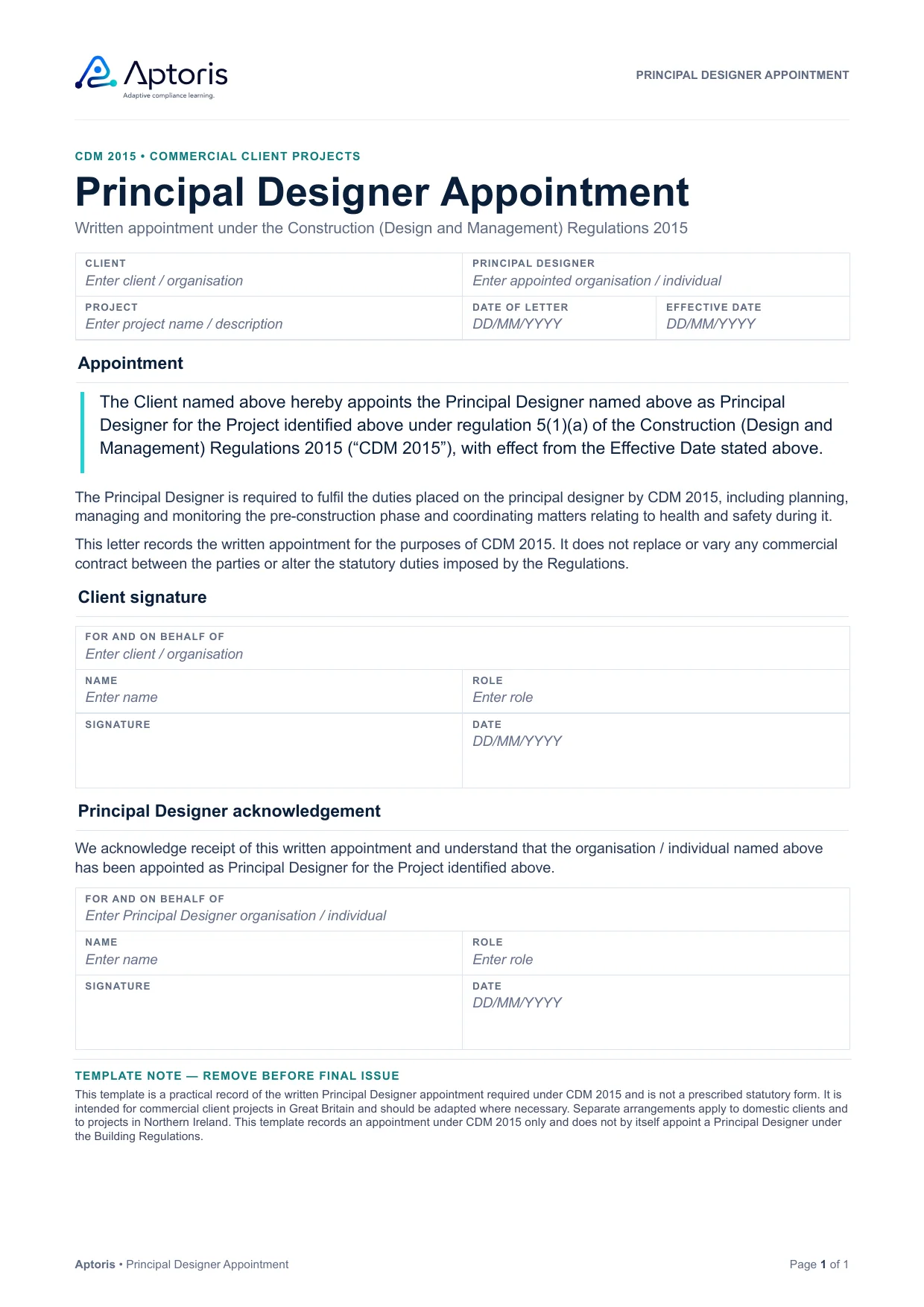
A simple written record identifying the client, Principal Designer, project and effective date, with client signature and Principal Designer acknowledgement.
This is the whole template: one A4 page, shown exactly as Word renders it. Every grey prompt is a Word content control, ready to replace.
Where Regulation 5 applies, the client must appoint the Principal Designer in writing. CDM 2015 does not prescribe a standard appointment form.
The template is designed to make the appointment clear (who is appointed, for which project and from when) without turning the letter into a full professional-services appointment.
Detailed services, scope, design stages, deliverables and interfaces can be dealt with through the commercial appointment, contract and other project documentation where appropriate.
Commercial clients appointing the Principal Designer under CDM 2015 for projects in Great Britain.
Add the client, Principal Designer, project and relevant dates.
Confirm the letter clearly identifies the person or organisation being appointed and the project concerned.
The client signs the written appointment. The Principal Designer acknowledgement provides a useful record of receipt.
Yes. It is free to download, with no sign-up and no email address needed. Select Download the free Word template and the file downloads straight away.
Yes. It is an editable Word document (.docx) with no macros. Each prompt sits in a Word content control: click it and type to replace it. Other software that opens .docx files should work, although formatting may vary.
Where more than one contractor is, or is reasonably foreseeable to be, working on the project at any time, the client must appoint a Principal Designer as soon as practicable and before the construction phase begins. HSE guidance says to appoint as early as possible in the design process. See when a Principal Designer must be appointed.
Yes. Regulation 5 requires the client to make the appointment in writing. This letter is one simple way to do that.
CDM 2015 does not prescribe the content. A clear letter identifies the client, the Principal Designer, the project and the effective date, and states that the appointee is appointed as Principal Designer under CDM 2015. See what the letter should cover.
CDM 2015 requires the client to make the appointment in writing; it does not require the Principal Designer to sign. The template’s acknowledgement section is an optional record of receipt.
Yes. HSE guidance says the Principal Designer can be an organisation or an individual, provided they are a designer with control over the pre-construction phase and have the skills, knowledge and experience the role needs. The letter’s prompts work for either. See who can be a Principal Designer.
Yes. The appointment can sit within a professional-services agreement or another written document, provided the Principal Designer role, the appointee, the project and the effective date are clear. See appointments in a professional agreement.
No. They are separate statutory roles. This template records the appointment under CDM 2015 only and does not by itself appoint a Principal Designer under the Building Regulations. See how the two roles differ.
It is designed for commercial clients. Different arrangements apply to domestic clients under Regulation 7, so check the domestic client arrangements before using it.
No. Aptoris is independent, and this template is not produced, approved or endorsed by HSE. CDM 2015 does not prescribe an appointment form. For authoritative requirements, refer to CDM 2015 and HSE’s guidance, L153 (opens in a new tab).
Guidance and templates for the wider appointment and the pre-construction phase.
When a Principal Designer must be appointed, what the client should check and how to make the written appointment.
What the Principal Designer must do to plan, manage, monitor and coordinate the pre-construction phase.
How the two roles differ, when both are needed and how they work together.
The matching one-page Word template for recording a written Principal Contractor appointment.
An editable Word template for the project information the client provides to designers and contractors.
The client’s duties under CDM 2015, including appointing the Principal Designer and Principal Contractor.
Editable .docx, 1 page, No sign-up required